๐Ÿ“ฑ Tech

I Spent Two Days With the New Rabbit R1 AI Device (And Yes, It's Kind of a Mess)

I Spent Two Days With the New Rabbit R1 AI Device (And Yes, It's Kind of a Mess)

Maybe you saw the demo. It looked incredible โ€” a tiny orange device that could order you an Uber, book a flight, play Spotify, all through natural language commands, no app required. The Rabbit R1 had everyone talking at CES this year. Pre-orders hit six figures in days. I got my hands on one earlier this week. After two days of using it as my primary 'get things done' device alongside my phone, I have thoughts. Lots of them. Not all of them positive.

First Impressions: It's Adorable

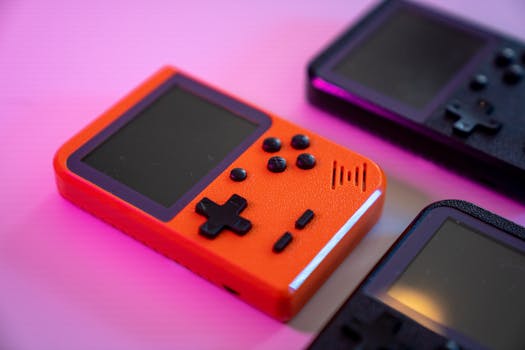
I'll give credit where it's due. The hardware design is fantastic. It's small, about the size of a deck of cards, in a bright orange color that's hard to ignore. The screen is tiny but crisp. The scroll wheel on the side feels satisfying to spin. There's a little camera that rotates up when you activate it, like a robot eye. It feels like a gadget from a near-future movie. You want to like it. You really do.

The Setup: A Preview of the Problems

Setting it up required downloading an app on my phone. Which immediately undercuts the whole 'replace your phone' pitch. I had to create an account, connect my Spotify, connect my Uber account, connect my DoorDash account. Each step involved logging in through my phone's browser. It took about 20 minutes. That's not terrible, but it's not the seamless magic the demos suggested. And here's the thing โ€” once it's set up, it still relies on your phone being nearby and connected via Bluetooth for many features. So it's not a standalone device. It's a phone accessory that looks like a standalone device.

What It Actually Does Well

When it works, it's genuinely neat. I said 'Hey Rabbit, order my usual from the coffee shop' and it did it. It knew my usual because I'd set it up earlier. It ordered a large oat latte, and it was ready when I got there. I also asked it to play 'the new Kendrick Lamar album' on Spotify, and it started playing 'GNX' within seconds. The voice recognition is solid โ€” better than Siri, about on par with Google Assistant. The visual responses are charming, like a little animated rabbit face that reacts to what you say.

The Problems Start Adding Up

But then I tried to do something slightly outside its script. I asked it to 'set a timer for 15 minutes for the pizza in the oven.' It set a timer for 15 minutes, but there was no label. So when the timer went off, I had no idea what it was for. I asked it to 'send a text to Sarah saying I'm running 10 minutes late.' It said 'I can't send texts yet.' Wait, what? A device meant to replace a phone can't send texts? It turns out, the messaging integration is limited to a few specific services and doesn't include standard SMS or iMessage. That's a huge gap.

Then there's the latency. Every single command takes 2-5 seconds to process. You say something, the rabbit face spins, and you wait. For simple things like checking the weather, that's fine. For complex things like booking a restaurant reservation through OpenTable, it took almost 15 seconds. That's longer than pulling out my phone and doing it myself. In a world where we're used to instant responses, the lag feels broken.

The 'Large Action Model' โ€” Hype vs Reality

Rabbit's big claim is the 'Large Action Model' (LAM) that supposedly learns to use apps on your behalf. In practice, it feels like a set of pre-baked integrations that work sometimes. I tried to order a specific dish from a nearby restaurant through DoorDash. It found the restaurant, but then said 'I can't complete this order in your area.' No explanation. I tried again later โ€” same result. I tried to book a Lyft instead of Uber. It said Lyft isn't supported yet. So you're locked into whatever integrations Rabbit has managed to build, which as of June 2026 is still a pretty short list.

The Battery and Heat Issues

The battery life is fine โ€” I got through a full day of moderate use. But the device gets warm. Not hot enough to burn, but noticeably warm in my pocket. The camera also doesn't have a privacy cover, and while it rotates down when not in use, I found myself feeling weird about it. There's something about a camera on a device that's always listening that feels invasive, even if the company claims it's secure. I'm not saying it's spying on me. I'm saying the feeling is hard to shake.

Who Is This For?

After 48 hours, I'm genuinely unsure who the Rabbit R1 is for. It's not powerful enough to replace a phone. It's not reliable enough to trust for important tasks. It's not open enough to build your own workflows. It's a cool demo, a fun gadget, but as a practical tool, it falls short. If you're a tech enthusiast with $199 to burn and you want to play with something futuristic, go for it. If you want to actually get things done more efficiently, just use your phone. Or wait for version 2. Because this one feels like a beta product that shipped too early.

That said, I'm not writing it off entirely. The ambition is real, and the hardware is lovely. If Rabbit keeps updating the software and adding integrations, it could become genuinely useful in a year or two. But right now? It's a promising idea that's not quite ready for prime time. I'll be keeping mine on my desk as a conversation starter, not as my daily driver.

TR
David Kim

We spend hours researching and testing before we write anything. If something changes, we update the article. About our process โ†’